
SaaS & Internal Tools
The tools your team runs on, and the product your customers pay for
Two kinds of build, one argument behind both: the software should be yours. Products your customers sign up for, with billing and sign-up that runs itself. And the internal panels that replace a spreadsheet nobody dares change.
- hooksubscription.deleted received
- oksignature verified
- routehandler matched 0 events
- 200acknowledged to provider
- exit 0webhook processed
The provider got its 200 and stopped retrying. The event name changed upstream, nothing matched it, and a cancelled account kept its paid plan until somebody read the revenue report.
Two ways people end up on this page
Either a no-code tool you've outgrown, or an MVP that now has paying customers and was never built for them. Different starting points. Same argument underneath.
What the monthly review shows
The tool is up. Everyone has a login. Tickets move through it daily and nobody has complained this quarter.
What's actually going on
Someone in finance can edit a field they should only be reading. Two people export to a spreadsheet every month, because the report they need got pushed to phase two.
And one person knows how to close the month.
-
Per-seat pricing turns on you
Fine at eight users. Painful at forty. And most teams keep paying anyway, because nobody has run the sums since the day they signed up.
-
Permissions get bolted on later
The platform's idea of roles doesn't match how your team actually works. So the workaround becomes the policy, and nobody can say who sees what.
-
Version control is a habit, not a system
Someone remembers to duplicate the app before editing it live. Right up until the Tuesday somebody forgets.
-
The platform can't host your customers
Internal tools assume one company and one list of logins. The moment people outside your business need accounts, billing and their own separate data, you're building a product. Most no-code platforms aren't priced or built for that.
-
The MVP proved demand, and nothing else
The prototype that won your first ten customers did its job. It usually has no walls between customers, no handling for failed payments, and no way to move the data. Which is exactly what customer eleven onwards depends on.
Four shapes, one rule under all of them
Products your customers use
People sign up, pay, and keep their own data separate from everyone else's. Billing, sign-up that runs without you, and separation the database enforces rather than something you have to remember.
Operations dashboards
Orders, support tickets, stock. Underneath, it's nearly always the same thing: records, statuses, and people who need to see their slice. We build the data model first and the screens second, which is the opposite of how most no-code apps grow.
Reporting portals for clients
Portals that read from your warehouse without exposing the warehouse itself. Chart.js covers most of what people ask for. When someone wants to drill down, or a chart no library ships, we reach for D3.
Approval and rules engines
Approval chains, notification rules, who gets assigned what. Visual rule builders can express this in theory but are miserable to debug. We write it as ordinary code with tests, so a broken rule gives you an error you can read rather than a support ticket.
What changes once customers are paying
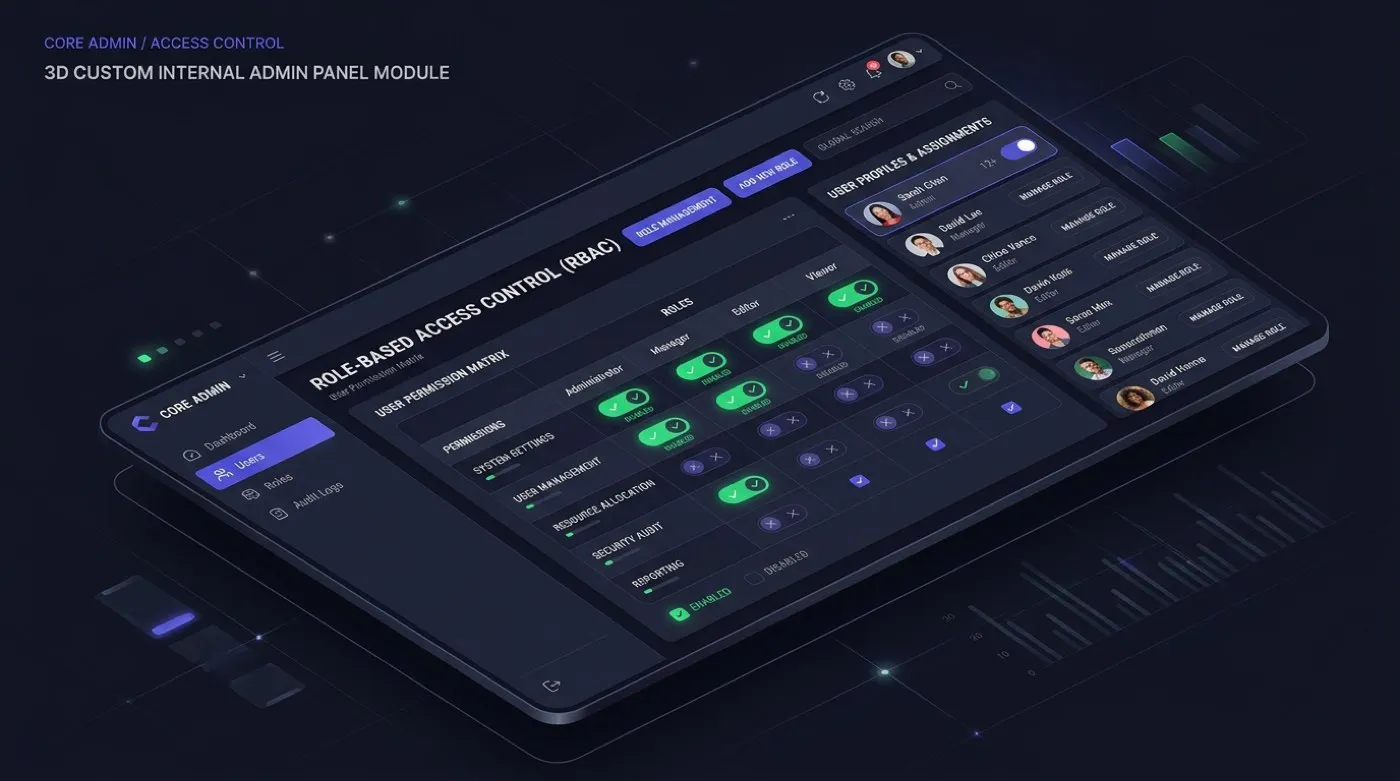
An internal panel and a real product look the same in a screenshot. They're different builds, and the difference is almost never the screens.
- Separation Every query locked to one customer, enforced by the database. That way a missing filter shows nothing instead of quietly showing another customer's rows. An internal tool can assume one company. A product can't, and bolting that on later is a rewrite.
- Billing Subscriptions, mid-month changes, and a plan for failed payments. The webhook handler has to cope with the same message twice, and it has to fail loudly when an event name changes upstream. That's the failure in the log at the top of this page.
- Sign-up People sign up themselves, verify their email, and trials end on their own. Nobody on your team sets up accounts. Everything an internal tool handles with a quick Slack message has to work at 2am with no human around.
- Uptime Your customers' working hours, not yours. An internal tool can be down over lunch. A product needs a status page, a way to roll back, and an honest answer about who's on call. We'll tell you if that answer is nobody.
- Support Somewhere to write in that isn't "message the developer". Product support is a running cost most first-time founders budget at zero, and it's the one that decides whether version two ever gets built.
Where product builds actually overrun
Not the feature list. It's separation, billing edge cases and sign-up, because all three are invisible in a wireframe and all three hold the thing up. We price them openly at the start, so you're not discovering them in week six.
Low-code wins this more often than we'd like to admit
Under about twenty seats? Workflows that are mostly forms and a few conditions? No need for the data to sit anywhere but the vendor's cloud? Then Retool or a well-set-up Airtable base is very likely right. Not a stepping stone. Just right.
| Factor | Low-code (Retool, Airtable) | Custom build |
|---|---|---|
| Cost, 10 seats, year one | A per-seat bill every month, and the split matters: Retool's published Business tier charges a builder a little over three times what it charges a viewer. Ten builders costs roughly three times what three builders and seven viewers costs. Check the current rates on their pricing page rather than trusting a figure on ours. | A one-time cost usually higher than the platform's first-year bill. Custom work is rarely the cheap option upfront. |
| Cost, 40 seats, ongoing | Roughly ₹2L to ₹8L a year, recurring, for as long as the tool is used. | Hosting and maintenance only, with no per-seat multiplier as headcount grows. |
| Logic ceiling | Bounded by what the visual builder can express. Workarounds accumulate as hidden debt inside the platform. | Bounded by engineering time. Which also means every feature request is a real cost, not a free toggle. |
| Data residency | The vendor's cloud, unless you pay for a dedicated tier, which narrows the price gap considerably. | Your database, your cloud account, your choice of region, from the start. |
| Exit cost | Exporting data is easy. Exporting the logic wired into the platform's automations is not: that gets rebuilt, not migrated. | You already own the repository. Switching developers means changing who reads the code. |
What we'd tell a friend
Under twenty seats and mostly simple workflows, stay where you are. Above that, run the sums yourself before calling anybody, us included.
Four things tend to flip it. Per-seat pricing crossing break-even at your real headcount, not the ten-seat demo everyone prices against. Logic the rule builder genuinely can't express, which is different from logic your team hasn't learned to phrase its way. A data rule a shared cloud can't satisfy. And more than three or four systems held in sync by something more complicated than a webhook.
Signs you have outgrown off-the-shelf
- Someone exports CSVs daily to move data between systems.
- Per-seat pricing is doing arithmetic against you and nobody has checked in a year.
- The tool almost does what you need, and the Notion workaround has a dozen manual steps. That workaround is the spec.
- Only one person knows how to run the month-end close. That is a bus factor of one, dangerous regardless of how good they are.
- A data-residency clause or security review rules out cloud-hosted SaaS outright.
None of these alone is decisive. Several together, in the same team, usually are.
Boring technology, so you can hire without us
PostgreSQL, not the newest graph database. React, not this month's framework. Well-known tools mean a bigger pool of people to hire from later, and fewer surprises in production.
- Frontend Next.js and Tailwind CSS. React Server Components for fast initial loads, with shadcn/ui as the component library: headless and accessible, with no built-in styling to fight.
- Backend Node.js and Prisma. TypeScript end to end for type safety. Prisma generates type-safe queries and handles migrations. Complex logic moves to a standalone Express or Fastify service.
- Database PostgreSQL on RDS or Supabase. Handles the overwhelming majority of internal-tool workloads. Realtime features add Supabase Realtime or Redis pub/sub, and documents go to S3.
- Auth Clerk or Auth0. We do not roll custom auth. Magic links, SSO and RBAC out of the box, with Auth0 where deeper Okta or Azure AD integration is needed.

Build the reports first, not last
Reporting gets scoped as phase two on almost every internal tool, and phase two rarely arrives. The daily features keep winning engineering time from a layer that only matters once a month, at the review meeting.
So you end up with a tool that runs the business but can't tell you how the business is doing. Then somebody quietly rebuilds the missing report in a spreadsheet. Which is where the whole project started.
- The metrics somebody actually presents get scoped in week one, alongside the CRUD screens.
- Chart.js for the common cases, D3 where drill-down or an unusual chart type is genuinely needed.
- Exports to CSV and a scheduled email, because that is what most people mean by reporting.
- Reads hit the warehouse, never the operational tables the tool writes to.
Five ways internal tools fail after launch
These are patterns we recognise from across the industry, not incidents this studio has personally cleaned up. If one sounds exactly like your Tuesday, that's the pattern working as described.
- The tool nobody uses A team builds a dashboard to replace a spreadsheet, and the spreadsheet wins anyway. Usually because the new tool solved the problem the requester described, not the one the five people using it every day actually have. Nobody watched anyone use it before calling it done. Low-code makes this worse in one way: a demo that looks polished after a day of dragging boxes sets an expectation the real workflow rarely meets.
- Permissions left till later Roles rarely make the first cut, because "let's get it working" beats "let's decide who sees what" every single time. Then someone in finance can edit a field they should only read. Adding a permission model to a schema that assumed one universal user is a rewrite wearing a different name.
- The report that never arrived Reporting gets scoped as phase two, and phase two rarely comes. The daily features keep winning engineering time from a layer that only matters once a month. So the tool runs the business but can't say how the business is doing, and someone quietly rebuilds the report in a spreadsheet.
- The handover that wasn't A tool gets deployed by whoever built it, from their own laptop, with logins only they hold. The deploy process does exist. It just lives in one person's head and one person's command history. When they leave, the fix is rarely a technical one.
- The glue that became the structure An integration starts as one webhook joining two systems, and that's genuinely the right call. Fast, cheap, easy to undo. A few months later it's a dozen automations nobody has mapped. When a vendor changes an API and several break together, the first job is working out what was connected to what.
Warning signs in any vendor, us included
-
"Unlimited customisation, any feature you can imagine." No platform and no custom build is unlimited. Ask what it specifically can't do yet. If the answer is "nothing", ask again.
-
"We'll figure out permissions during the build." If the first meeting didn't cover who sees what, that gets designed later under time pressure. Which is exactly how the problem above happens.
-
A fixed quote before anyone has looked at your data model. Counting screens is easy. Working out the logic hiding behind them is not. A number given before anyone looks is a guess in a suit.
-
Reluctance to hand over deploy access at project end. If a vendor is uneasy about you holding the keys, that's the handover problem above. Just not yet.
Four things we'd stand behind on any project
- Ship in weeks. An internal tool doesn't need pixel-perfect design. It needs to work every time, and to be improved against real use rather than a mockup nobody has clicked.
- Boring technology wins. Fewer surprises in production, and more people to hire from later.
- Documentation isn't optional. A README, a diagram, a list of what every field means, and a written guide. Not generosity. Undocumented systems become a support headache for both of us.
- You own everything. Code, docs, logins, server config. Want to hire someone else tomorrow? You can, and you lose nothing in the switch.
The shape most projects follow
These are typical ranges, not promises. A tool with three integrations and one with fifteen don't take the same number of weeks, and we'd rather widen the estimate now than quietly slip it later.
| Phase | Typical duration | What you get |
|---|---|---|
| Discovery and data modelling | 1 to 2 weeks | A schema with roles and permissions designed in from the start, and a written scope. |
| Proof of concept | 1 week | One real workflow running against real data, with no visual polish yet. |
| Build | 3 to 8 weeks | The full tool: CRUD, roles, and the workflow logic a low-code builder could not express. |
| Handover | 1 week | Deploy access, credentials, a written runbook, and a walkthrough with whoever inherits it. |
| Support window | Included post-launch | Bug fixes and small adjustments at no extra charge. Anything beyond that is scoped as separate work. |
A rough band, not a quote
A dashboard with a handful of roles usually lands between ₹2 lakh and ₹6 lakh to build. Then a modest monthly figure for hosting once it's live.
A full product with billing and separate customer data is a different conversation. We price that after discovery rather than upfront, for the reason above: a fixed number before anyone has seen your data model is a guess.
Initial build
CRUD dashboard, roles and permissions, and the workflow logic behind them.
Hosting billed separately, at cost.
- Roles built into the database from day one
- Runs in your own cloud account
- A README, a diagram, a data guide and a runbook
- A support window after launch, included
Frequently asked questions
The first one talks you out of hiring us, and it is the one we mean most.
Can you build a real product, not just an internal tool?
Yes, and it's a different engineering problem to an internal panel. Keeping customers' data apart is enforced by the database rather than by remembering to add a filter. Billing has to survive the same message arriving twice, and cope with a card that fails. And sign-up has to work without anyone on your team setting up an account.
We price those three openly at the start, because that's where product builds overrun.
Should we just use Retool instead?
Often, yes. If you're under about twenty users and your workflows are mostly forms, we'll say so on the first call rather than the fifth.
We'd rather lose a deal at discovery than take on a project we don't think should exist. A fair few of our discovery calls end exactly that way.
How long does a typical build take?
Have a look at the phase table above for the usual ranges. The honest answer is that integrations drive the schedule, not screens. A fifteen-screen dashboard pulling from one source is quicker than a three-screen tool wired into five systems.
Can you connect to Salesforce, SAP and the rest?
We've connected to Salesforce, HubSpot, NetSuite, QuickBooks, Stripe and Twilio, plus enough smaller and older systems that the honest count is "depends on the week".
If it has an API, we can connect to it. If it doesn't, we can sometimes bridge with browser automation, though that's a different service with its own honesty problems.
Who handles hosting and maintenance after launch?
Three options, and you pick. We host it and run it. Or we set it up inside your own AWS, GCP or Azure account and hand over the keys. Or you host it and we stay on for support and new features.
What if the project runs over?
It happens. Usually when the data model turns out messier than discovery suggested, or someone on your side changes their mind late.
We flag scope changes in writing before building past them, rather than absorbing the cost quietly. You hear about a slip before the invoice does.
Can we bring it in-house later?
Yes, and we design for it. Boring, well-documented technology exists precisely so another team can pick this up without us. If we've done the job properly, hiring us again should feel optional.
What do you turn down?
A small number of things, on principle rather than ability. Certified medical or financial software needing formal sign-off we're not in a position to give. And any project where the real ask is to get around a privacy or security control instead of fixing why it's there.
Send us the spreadsheet
The one that quietly turned into a system. We'll tell you whether it needs a custom tool, a better Retool app, or just three fewer tabs.
Related: workflow automation and Chrome extensions