
Chrome Extensions
Extensions built around your work, not the Web Store's rules
Private Chrome extensions that sit inside your CRM, your admin panels and your team's inbox. Data entry that used to mean four tabs and a lot of copy-paste turns into one click. Building it is the easy half. The rest is getting it onto every laptop, controlling updates, and deciding who sees what.
- wakebulk sync, 312 records
- okbatch 1 of 7 written
- idleworker terminated after 30s
- statebatches 2–7 held in memory
- exit 0no error reported
A V3 service worker sleeps when idle. Progress kept in a variable dies with it. Anything that must survive belongs in chrome.storage, and the timer belongs in chrome.alarms.

Getting it onto every laptop, and only to the right people
What the rollout report said
Installed on 48 of 48 managed laptops at the next policy refresh. Zero failures.
What the usage data said
The icon is on 48 toolbars. Installed is not the same as used, and a vendor quoting the first number as if it were the second is counting the wrong thing.
Pushed out through your device management
We package it so it installs silently through Group Policy or your MDM profile, whether that's Intune, Jamf or Google Workspace. On the next policy refresh it's on every managed machine. That guarantees it's there. It doesn't guarantee anyone opens it, so we track use separately from installs.
Permissions come from your existing login
Roles come straight from Okta or Azure AD when someone signs in. A field rep and a finance manager run the exact same install and see different buttons. No second version to maintain.
Your own update channel
Store extensions update through Chrome automatically. Privately deployed ones need an update address you host, which Chrome checks on its own schedule. Nobody controls when that check happens, so even on a private channel a hotfix isn't instant.
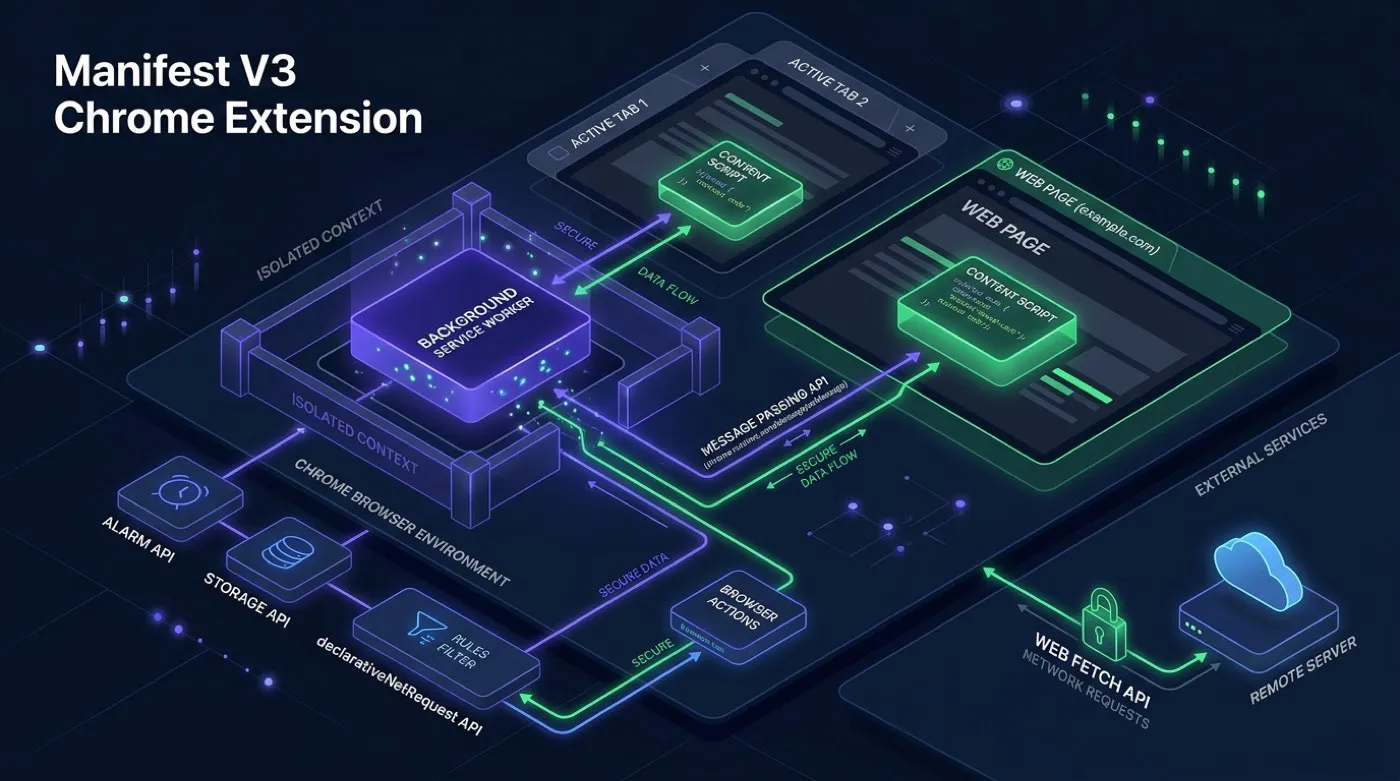
What Manifest V3 actually changes, day to day
Five constraints that shape nearly every build. Not marketing talk about a security sandbox.
-
The background script falls asleep
A V3 service worker is torn down 30 seconds after its last event. Since
Chrome 110 every event resets that timer, so a worker doing steady work stays up,
but a single call that runs past five minutes is killed regardless, and so is a
fetch()whose response takes more than 30 seconds to arrive. Anything that has to survive goes intochrome.storage, not a variable sitting in memory. Timers move tochrome.alarms, because a normal timer doesn't survive a restart. - Anything you inject needs its own bubble A content script runs in its own little world but shares the page's actual HTML. So Gmail's or LinkedIn's stylesheet still reaches whatever you add. We mount panels inside a Shadow DOM root specifically so the host page's CSS can't leak in and wreck the layout.
- Your script borrows the host page's network rules A request made from inside a script running on Gmail follows Gmail's rules, not yours. The background worker has no such limit. So every API call gets passed to the worker, which makes the actual request.
- Blocking requests works differently now The old approach let your code inspect and cancel every request as it happened. V3 replaced it with a fixed rule list Chrome checks before your code runs at all. Anything you can write as a rule still works. Anything that needs to read the request body first doesn't.
- Users can say no, one site at a time Access to a site used to be granted once at install. Now a user grants, refuses or withdraws it per site. An extension that ran everywhere now has to ask, and some people say no. We build so the affected feature fails on its own instead of taking the whole extension down with it.
A deadline that kept moving
Still running a Manifest V2 extension? It isn't automatically broken. Google's rollout ran years behind its own first timeline, and managed devices got an exception that ordinary users never did. The correction matters more than the date. This was never one switch being flipped, and treating it that way is how teams get caught out.
| When | What actually happened |
|---|---|
| 18 November 2018 | Google publishes the Manifest V3 proposal, with
declarativeNetRequest replacing the blocking form of
webRequest. Ad-blocker and privacy-extension authors object
immediately, because their filtering was built on the API being removed. |
| January 2022 | The Chrome Web Store stops accepting new public and unlisted V2 submissions. Private submissions carry on until June 2022. Anything already listed keeps running. |
| January 2023 | The month Google had named for the phase-out to begin, in Chrome 112. It slipped. The schedule was revised in December 2022 and then paused outright until May 2024. |
| 3 June 2024 | Warning banners appear on chrome://extensions in Beta, Dev and
Canary. Stable follows on 9 October 2024, and users can still switch a
disabled extension back on. |
| 31 March 2025 | V2 is disabled by default on every channel. Managed devices are exempt
through June 2025 under the
ExtensionManifestV2Availability policy, which is the exception
ordinary users never got. |
| 24 July 2025 | Re-enabling stops working. Chrome 138 is the last release where the enterprise policy still does anything; Chrome 139 removes it, and V2 stops running for everyone who takes that update. |
| 31 August 2026 | The remaining V2 extensions come off the Chrome Web Store. Ten days from the time of writing. |
The lesson isn't which date to circle. An extension isn't a build-once thing the way a cron script is. It lives inside a platform another company controls, and that company missed its own deadline more than once. Budget for at least one forced rewrite somewhere in its life, because the vendor picks when.
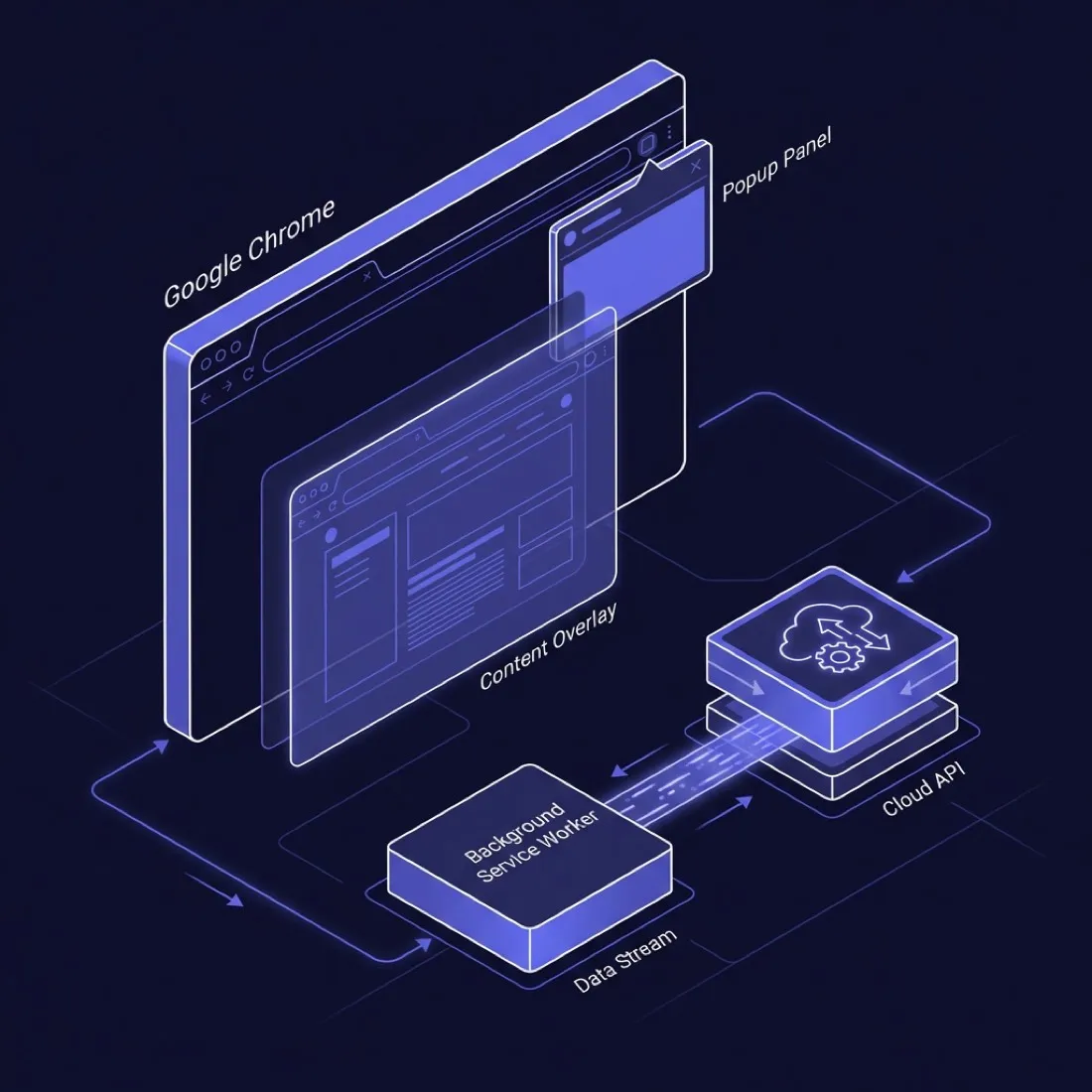
Four moving parts, three different lifespans
Most in-house extensions go wrong by treating these as one program. The popup dies when you close it. The content script dies with the tab. And the background worker dies on its own schedule, whether or not something is waiting on it.
- Popup Lives while it's open. Holds nothing worth keeping. Everything it needs gets read back from storage each time it opens.
- Content script Lives with the tab. Shares the page's HTML and its network rules, so its panels sit inside a Shadow DOM root.
-
Background worker
Sleeps when idle. Makes the network calls the content
script can't, and keeps timers in
chrome.alarms. -
Storage
Outlives all three.
chrome.storageis the only place anything survives a restart.
Four shapes that cover most of what people ask for
Profile straight into the CRM
Sales teams pull details off a profile page and push them into Salesforce or HubSpot in one click. It reads the page directly, because there's no API to ask.
Doing fifty things at once
Tick fifty rows in an admin panel, click once, and the same action runs on all of them. Replaces an hour of clicking one row at a time.
A sidebar in the inbox
Open an email and a panel shows that person's history, past orders and open tickets, pulled live from your own systems. No hunting through tabs.
Keeping a record for audit
Screenshots and page snapshots of specific pages for your audit trail. Terms someone accepted, or what the pricing said on a given day. Stored encrypted in your own bucket.
What your security team will ask, and the honest answers
Anyone can unpack an extension and read the code inside. Assuming otherwise is the actual vulnerability. So secrets get fetched after the user signs in to your backend, never typed into the code. Manifest V3 already blocks inline scripts and remote code on the extension's own pages. On top of that we limit which domains it can reach. So if a library it depends on gets compromised, it can't quietly phone somewhere new.
You get the complete source, unobfuscated. Your security team can read every line before it goes near a single laptop.
Chrome Web Store, or straight to your laptops?
| Factor | Chrome Web Store | Private (GPO / MDM) |
|---|---|---|
| Review time | 1 to 7 days, unpredictable | Instant, self-hosted |
| Approval risk | Google can reject or pull the listing | You control distribution |
| Auto-update | Automatic via Chrome | Requires a self-hosted update_url |
| Public visibility | Install count and reviews are public | No public footprint at all |
| Best for | Public tools, broad reach | Internal tools, sensitive workflows |
What we'd tell you to do
For a tool your own staff use, deploy it privately. The Web Store only earns its overhead when you're building for people outside your company.
Warning signs in any extension vendor, us included
-
They quote 100% adoption for a force-installed extension. Pushing it out guarantees the icon is on the toolbar. It says nothing about whether anybody clicks it.
-
They cannot walk you through the manifest permissions in plain language. Every permission should match a feature you can name. If they shrug at "why does it need access to every site", Google's reviewers will ask the same thing.
-
They treat Web Store review as a formality. A vendor who's never had a submission rejected hasn't shipped enough of these.
-
Flat pricing regardless of scope. A sidebar for one CRM and a five-site tool with role permissions are not the same job. If we quote a fixed number before seeing your sites, ask us to justify it.
From first call to a working install
What happens, in order. The spec is yours either way, whether you carry on with us or not.
-
1
We work out what it has to touch
Which sites, which parts of those pages, which of your internal systems it will call. For anything on a third-party site, we check what that site's terms allow before writing a line of code.
-
2
Design
Popups, sidebars and injected panels get designed to match your brand and to survive the host page's styling. You see wireframes before we touch any code.
-
3
Build
Written for Manifest V3 from the start, not migrated later. How the background worker keeps state, and when permissions get asked for, are decided up front instead of patched in when the pilot breaks.
-
4
Pilot with a small group
Before it goes company-wide, a handful of people run it for a week or two. That's where wrong assumptions about page structure and awkward permission prompts actually show up. Not in a demo recording.
-
5
Rollout and handover
For a private rollout you get the packaged extension, the update file and a written guide for your IT team. For a store listing we handle the submission and the reviewer's questions. Either way you hold the source and the keys from day one.
Three things that go wrong in in-house builds
Worked on the dev machine, broke everywhere else
The developers were signed in already, with months of normal browsing behind them. Fifty fresh installs looked nothing like that and got flagged within a day. The fix is pacing, keeping sessions, and behaving less like a robot.
Rejected for reasons nobody could explain
We've seen extensions turned down for asking too much, even when every permission was genuinely needed. Ask for the smallest set, request extra ones only when the user hits that feature, and explain each one in the notes.
People complain it slows the browser down
A script that loads on every page and watches the whole document does cause real lag on heavy sites. Limit it to the pages that need it, and watch only the parts that matter.
Cost follows how many systems it touches
Two numbers matter. What it costs to build, and what it costs to keep alive through Chrome's next change.
Single-workflow extension
A sidebar or popup wired into one CRM or internal tool. No juggling permissions across several sites.
Typically three to five weeks.
- Built for Manifest V3, panels that survive the host page
- A ready-to-push package and a written guide
- A small pilot before it goes company-wide
Multi-site or RBAC-heavy
Works across several admin panels, shows different buttons based on someone's role, and updates through a channel you host.
Typically eight to twelve weeks.
- Roles pulled live from your existing login
- An update channel you host yourself
- Scheduled checks against the sites it touches
Neither number covers what happens after launch. Chrome ships a new version roughly every four weeks, and any of those can change how background workers or permissions behave with little warning. Maintenance is billed separately, usually monthly. A vendor folding "lifetime support" into one fixed fee is either underpricing that risk or planning to ignore it.
Frequently asked questions
Chrome moves the platform underneath you. These are the questions that follow from that.
Can we skip the Chrome Web Store?
Yes, for company laptops. We set up distribution through the Google Workspace admin console, Windows Group Policy, or an MDM profile like Intune or Jamf. Staff just find it already installed.
It never touches the public store, and there's no review queue sitting between you and a fix.
What if one of the sites changes its layout?
We anchor onto text and labels rather than fragile page paths, which survive redesigns far better.
For clients running this in production we also run scheduled checks against those sites and patch within an agreed window once something confirms broken.
How does it log in to our systems?
Through whatever you already use, over OAuth 2.0 or SAML. The extension picks up a short-lived token after the person signs in with your identity provider. No passwords are ever stored in the browser.
Can you guarantee our submission passes review?
No, and be careful of anyone who says yes. Google's reviewers apply standards that shift without a changelog, and we've had a submission rejected over a permission that sailed through on a near-identical build months earlier.
What we control is asking for the smallest permission set and explaining each one clearly. Their queue isn't ours to control.
What if someone refuses a permission?
That one feature stops working, usually with no graceful way around it. We build so a refused permission takes down only the feature it powers, not the whole extension.
If a client wants us to ask for something broader than a feature needs, purely to dodge that conversation, we'll say no. It pushes the risk onto people who never agreed to it.
Do you take over an extension someone else built?
Often, yes. We read through the existing manifest and code first. Sometimes the honest answer is that rebuilding costs less than patching, especially if it's still on Manifest V2 or was written before anyone understood the background worker rules.
We'll tell you which is true before quoting a number.
What happens when Chrome changes the rules again?
It already has, more than once since V3 shipped. The V2 deadline above is the clearest example of a platform vendor moving its own goalposts. An extension isn't something you build once and forget.
That's exactly what a maintenance retainer is for. We read Chrome's release notes so you don't have to.
Got an extension in mind?
Tell us which sites it needs to touch and who should see what. We'll tell you whether it's a three-week build or a three-month one, before you commit to anything.
Related: workflow automation and internal tools