
Web Scraping
The selector breaks. The pipeline keeps going.
A scraper that returns a clean 200 on an empty page looks exactly like one that works. We make the request look like the browser it claims to be, check every row before it lands, and watch the row count instead of the uptime graph.
- startfetching 240 pages
- ok240 fetched, 0 errors
- okparse complete
- writerows written: 0
- exit 0run succeeded
A 200 response and an empty page. The price moved from a class to a data-price attribute. The selector matched nothing, the job wrote a null, and the dashboard stayed green.
A clean response, and an empty page
Most scraper problems are loud. A connection drops, a proxy dies, someone sees an error in Slack. Those are the cheap ones.
What the run reported
All 240 product pages came back fine. No timeouts. No proxy errors. Nothing retried.
Finished in the usual time. Exit code 0.
What it actually wrote
The shop had moved its price into a different bit of code. Our rule was still looking in the old place.
It didn't crash. It found nothing useful and wrote a blank into every row.
Pulling one page with a script? A day's work in Python. Getting from there to something your business can rely on is a different job. It isn't about writing smarter rules. It's about what happens to the data the day the site changes.
It isn't did the job run. It's did it save what was really on the page today.
- FetchFingerprint matched to the declared browser
- ExtractSelectors with fallback anchors
- ValidateSchema check before anything is written
- DeliverWarehouse, or a dead-letter table
Where most scrapers skip a step
Fetch and extract are the fun bits, and that's what every tutorial covers. Check and deliver are where a quiet failure gets caught. They're also the two that get dropped when a project runs late.
What we pin down, in this order
- Target Which sites, which pages, and how deep the paging goes.
- Shape The fields you need, what type each one is, and which are allowed to be empty.
- How often Daily, hourly, weekly. And what a stale record actually costs you when it slips.
- Volume Records per run. This sets your proxy bill more than anything else does.
- Delivery A table in your warehouse, a file in S3, or we post it to an endpoint of yours.
Built for your target, priced to match
Extractors written for your site
Written against the real markup, the real paging, and whatever checks the site runs today. Not a template pointed at a URL.
Getting past the blocks
We match the fingerprint and rotate proxies, but only as far as the site actually pushes back. No point paying for defences nobody is using.
Every row gets checked
Each record is checked before it reaches your warehouse. Anything that fails goes to a side table with the reason attached.
Alerts that mean something
Row counts per run. Blank rates per column. And an alert when a run writes nothing on a day that usually writes thousands.
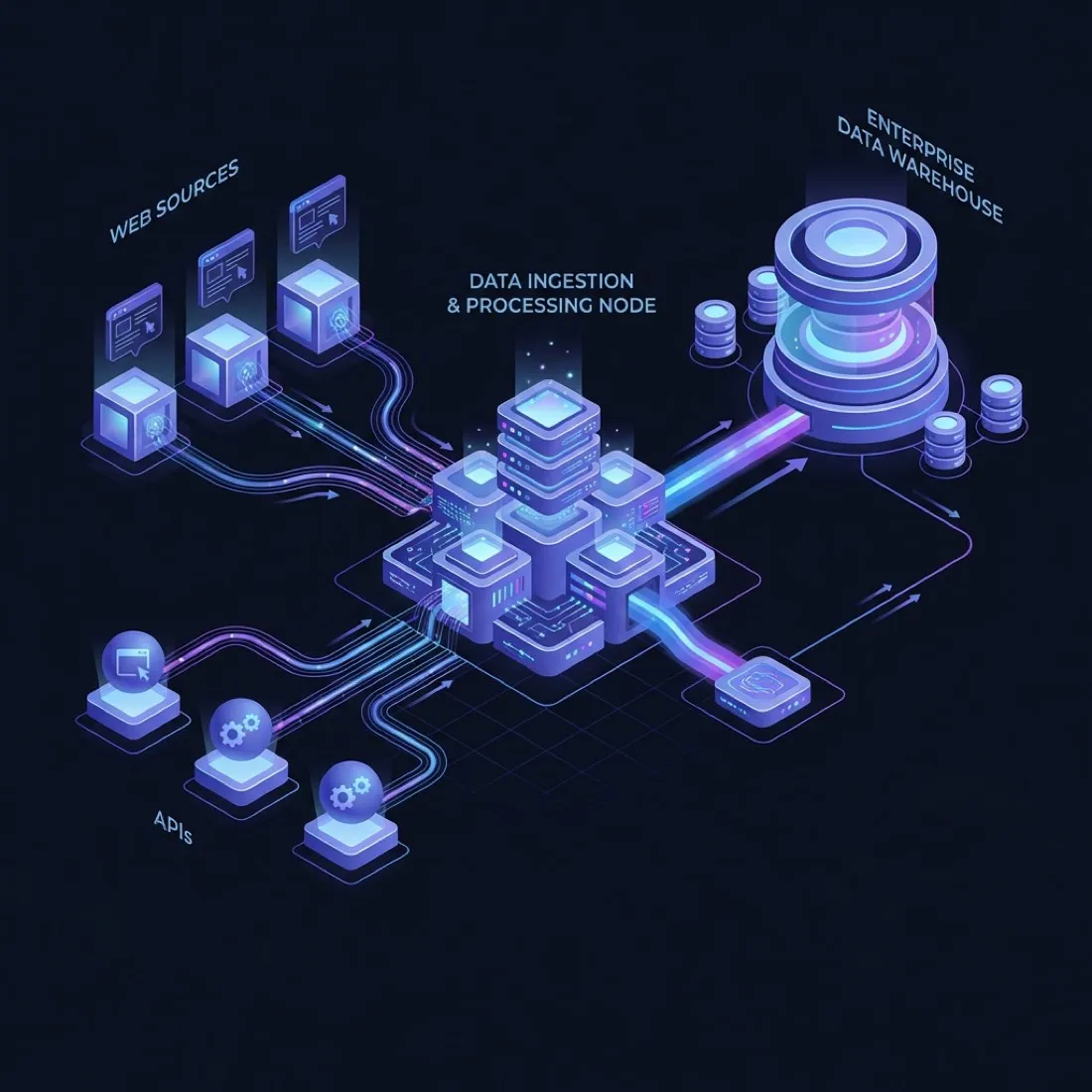
Where a record goes after it leaves the page
Sources on the left. Your warehouse on the right. In between sits the part that decides whether today's run can be trusted. Nothing reaches storage without passing the check.
- Fetch Python, with the fingerprint matched to a real browser. Routed through home-user proxies when the site warrants it.
- Render Playwright in a container. The browser version is pinned, so a Chrome update can't change how your scraper behaves overnight.
- Check Every record gets checked against a schema. Failures land in a side table with the error attached, not in a log nobody reads.
- Deliver Into your warehouse. Plus row counts and blank rates written per run, so an empty result raises an alarm.
What actually blocks a scraper
Cheapest checks first, most expensive last. That's the order sites tend to add them in.
| Mechanism | What the target is checking | What we do about it |
|---|---|---|
| TLS / JA3 fingerprint | Whether the handshake matches the browser the User-Agent claims. | Make the handshake match the browser we say we are. It's the cheapest check a site can run, and the one most scrapers fail first. |
| Canvas and WebGL | Whether rendering output looks like real hardware. | Vary the output a little, but stay inside the range a real device would give. Perfectly identical is as suspicious as obviously fake. |
| Rate limiting and IP reputation | Request pacing, and whether the address belongs to a data centre. | Stay under the limit and route through home-user addresses. This is where your monthly bill actually goes. |
| Interactive challenge | Whether a human is present. | We don't solve these. We go looking for a paid feed or an official API, and tell you straight if neither exists. |
Bad data costs more than no data
No data is an outage. Everyone notices. Bad data is worse, because someone acts on it. It sets a price, triggers a restock, or ends up in a report that goes to a board. So every record gets checked before it goes anywhere.
A row that fails lands in a side table with the exact reason attached. Not a catch-all log nobody opens. Once the extractor is fixed, those rows run again through the same code. No special migration script.
from pydantic import BaseModel, HttpUrl, field_validator


class ExtractedProduct(BaseModel):
    sku:         str
    price:       float
    in_stock:    bool
    product_url: HttpUrl

    @field_validator("price")
    def sane_price(cls, v):
        # a scraped 0.0 is a parse failure,
        # not a free product
        if v <= 0:
            raise ValueError("non-positive price")
        return v

# A field that fails validation routes the whole
# row to a dead-letter table with the error
# attached, and never reaches the warehouse.Mistakes we keep running into
Across sites that have nothing else in common.
Same IP for logging in and scraping
Hit a hundred pages a minute from the address you logged in with, and it's the account that gets flagged, not just the request. Keep the two separate.
Rules tied to one class name
A class like .ProductCard__price is a convenience, not a
promise. A build tool generated it and will change it without telling
anyone. Anchor on labels and visible text where you can.
Passwords sitting in the code
A login password typed straight into a script is a problem with a delay on it. Secret managers exist and cost close to nothing.
Ignoring robots.txt with no reason written down
Going past it without a business reason on record is risk with no upside. We write down why, so someone can review the call later.
Where the law sits, honestly
Most of what you'll read online about scraping law is American. That isn't what binds a studio billing in rupees, or most of its clients. Indian law is the relevant one here, and this section is waiting on someone qualified to write it. Until then, here's our honest position. We work with information anyone can see. We keep our request rate low enough that we're not slowing the site down. We don't touch personal data without a lawful reason. Anything near the line, your lawyer should read a written description of what the pipeline does, and we'll write one.
Warning signs in any scraping vendor, us included
-
"100% success guarantee" Site defences change with no warning. Anyone promising success is either lying, or only scraping sites that don't fight back.
-
"Proprietary AI bypasses" Getting through is about fingerprints and proxy quality. There's no clever model doing it. If they can't explain what a fingerprint mismatch is, they're reselling someone else's tool.
-
Flat pay-per-row pricing A site that fights back costs far more in proxy fees than a plain one. One flat price across both means corners get cut on the expensive job.
-
No answer on what happens when the layout changes It will change. Ask what spots it, how quickly, and who pays for the fix.
Four phases
-
1
We look at the target first
We check what the site does to block scrapers and give you a straight read, including the monthly proxy cost. If it's not worth doing, you find out here.
-
2
A small proof on your real target
We pull and check real records from the actual site, so you can look at the output before we price the full build.
-
3
The full build
Retries, speed limits, row checks, a side table for failures, and delivery into your warehouse.
-
4
Support after that, if you want it
We watch the row counts and patch the extractor when the layout moves. Optional. The handover exists so saying no is a real choice.
We price per pipeline, never per row
Per-row pricing makes a vendor want your volume up and their proxy spend down. Both of those pull against what you want.
Build, single target
One site, fully checked, delivered where you need it.
By how defended the target is and how much post-processing is in scope.
- Fingerprint matching and a proxy plan
- Every row checked, failures kept to one side
- Delivered to your warehouse, code in your repo
Maintenance
We watch the numbers and fix things when the site changes.
Per month, by pipeline count and target volatility.
- Alerts on row counts and blank fields
- We patch it when the layout moves
- Proxies and hosting billed at cost
Frequently asked questions
Two of these have answers a vendor would rather not give. Those are the two worth reading.
Is web scraping legal?
Depends on the data, the country, and the terms attached to the source. We stick to information anyone can see, keep our request rate low enough that we aren't slowing the site down, and we don't touch personal data without a lawful reason.
We're engineers, not your lawyers. For anything near the line, get your counsel to look. We'll write down exactly what the pipeline does so they have something real to read.
Do you solve CAPTCHAs?
No. When a site puts up a challenge screen, that's a deliberate statement about automated access. We go looking for a paid feed or an official API instead.
If neither exists, we'll tell you the project isn't worth doing rather than sell you something that breaks in a month.
What happens when the site changes its layout?
The row-count and schema checks catch it, usually before you do. A run that writes far fewer rows than yesterday, or one whose records start failing the check, raises an alarm instead of passing quietly.
On a maintenance retainer we patch the extractor and re-run the missed window through the same code. The gap fills in instead of staying a hole in your data.
Why not use Octoparse, Apify or a similar platform?
For a pilot, or a site that doesn't fight back, use them. They'll get you a first result faster than we will, and we'll say so.
Two things change at scale. Their servers carry a fingerprint protected sites have already seen thousands of times. And the per-credit bill keeps growing while each record stays worth the same to you.
Can you scrape a site that needs a login?
Sometimes, and it deserves a longer chat than a yes. Logging in usually means someone accepted terms, and it's the account that carries the consequence, not the IP address.
Where it's legitimate, like your own data sitting inside a supplier portal, we use a limited account, keep the password in a secret manager, and pace requests well below anything that looks automated.
Who owns the pipeline and the data?
You do, both. The code lands in your repo, the pipeline runs on your infrastructure, and the data goes to your warehouse. There's no platform of ours sitting in the middle that stops working the day you stop paying us.
Send us the target
A URL, and a line about the records you need. We'll tell you what's guarding it, roughly what the proxies will cost each month, and whether it's worth building at all.
Related: workflow automation and Chrome extensions